


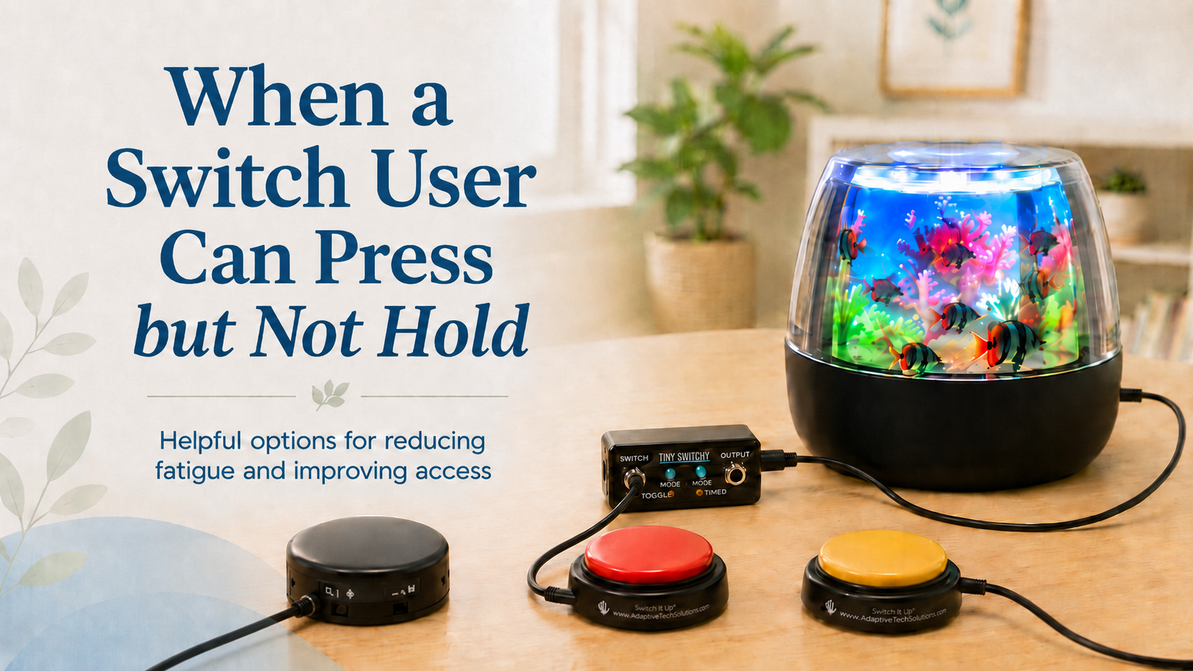
When a Switch User Can Press but Not Hold: Simple Ways to Reduce Fatigue and Improve Access
When a Switch User Can Press but Not Hold: Options for Reducing Fatigue During Switch-Adapted Play
For many switch users, the challenge is not always pressing the switch. Sometimes the bigger challenge is holding the switch down long enough to keep a toy or device activated.
This can happen for many reasons. A person may have limited strength, reduced endurance, fatigue, decreased motor control, or difficulty sustaining pressure for more than a couple of seconds. When this happens, switch-adapted play can quickly become frustrating instead of motivating.
The good news is that there are several helpful options to consider.
When the User Can Press the Switch but Cannot Sustain Pressure
If the user is able to press a switch but does not have the stamina or strength to keep holding it down, one helpful option is adding a Tiny Switchy.
The Tiny Switchy is placed between the switch and the adapted toy. Instead of requiring the user to continuously hold the switch down, it allows the toy to continue activating after the user releases the switch.
This can be especially helpful for individuals who become fatigued when they have to maintain pressure on a switch for more than a short time.
Two Ways the Tiny Switchy Can Help
The Tiny Switchy offers more than one way to support switch access.
It can be set so that once the user presses and releases the switch, the toy continues to activate for a selected amount of time. This gives the user the reward of continued toy activation without requiring sustained pressure.
It can also be set so the toy keeps going until the user presses the switch again to turn it off. This can be useful when the goal is to give the user more control over starting and stopping the activity without requiring them to hold the switch the entire time.
An Important Compatibility Note
The Tiny Switchy works best with toys that normally stop as soon as the switch is released.
It does not work the same way with products that already have timers built into them. Many plush adapted toys have internal timers, so the Tiny Switchy may not be the right solution for those items.
A simple way to think about it is this: if the toy only runs while the switch is being held down, the Tiny Switchy may be a good option. If the toy already runs on its own timer after a brief switch press, then the Tiny Switchy is usually not needed and may not function as expected.
Choosing the Right Switch Surface
Another benefit of using the Tiny Switchy is that it allows you to use a wide variety of switches with it.
This can be very helpful because some users need a switch with a larger surface area. A larger target can make activation easier for individuals who do not have refined or precise motor movements.
For example, a user may be able to activate a larger plate-style switch more successfully than a very small or highly precise switch. When fatigue or motor control is a concern, the size, placement, and sensitivity of the switch can make a big difference.
When a Smaller or More Sensitive Switch May Be Helpful
Some users do have more refined movements but need a switch that requires very little effort to activate. In those cases, smaller or more sensitive switches may be appropriate.
The Micro Light Switch and the Super Sensitive Microswitch both require only light pressure to activate. These can be helpful when the user has enough motor precision to target a smaller switch but does not have the strength for a switch that requires more force.
For individuals who have difficulty applying pressure at all, experience discomfort with touch, are tactilely sensitive, or have motor patterns that make direct pressing difficult, the Hover Proximity Switch may be another option to consider. The Hover Proximity Switch does not require physical pressure. Instead, it activates when the user moves close enough to the switch surface.
This can be a helpful option for individuals who have very limited strength, pain with pressure, tactile sensitivity, or motor patterns that make direct switch pressing difficult.
Matching the Tool to the User
There is not one single “best” switch setup for every person. The right solution depends on the user’s movement, strength, endurance, accuracy, fatigue level, positioning, sensory preferences, and the type of toy or device being used.
For a user who can press but cannot hold, the Tiny Switchy can often reduce fatigue and make switch-adapted play more successful.
For a user who needs very light touch activation, the Micro Light Switch or Super Sensitive Microswitch may be appropriate.
For a user who needs access without applying pressure, or who is tactilely sensitive and does better with reduced physical contact, the Hover Proximity Switch may be worth considering.
Final Thoughts
When a switch user cannot hold a switch down for more than a couple of seconds, it does not necessarily mean switch access is not appropriate. It may simply mean the setup needs to be adjusted.
Adding a device like the Tiny Switchy, choosing a switch with a larger target area, or selecting a lighter-touch option such as the Micro Light Switch, Super Sensitive Microswitch, or Hover Proximity Switch can make access easier, reduce fatigue, and improve participation.
The goal is always to make switch use as successful, comfortable, and meaningful as possible for the individual user.
Recent Posts
-

Free AAC Apps: Expanding Communication Without the High Cost
Featuring Weave Chat AAC and SoundingBoard Everyone deserves a reliable way to communicate. For indi …Jul 27, 2026 -
When a Switch User Can Press but Not Hold: Simple Ways to Reduce Fatigue and Improve Access
When a Switch User Can Press but Not Hold: Options for Reducing Fatigue During Switch-Adapted Play …May 06, 2026 -

Switch Adapted Toys: Making Play Accessible for Everyone
Have you ever considered how much joy a simple toy can bring to a child? For many children with di …Dec 06, 2025
